Tuesday, December 17, 2019

Announcing Bot Libre 8, now open source!

We have released Bot Libre 8!

The worlds most advanced bot platform just got better. Bot Libre 8 is a free and open source platform for developing and hosting bots. Bot Libre 8 includes support for chatbots, virtual agents, virtual assistants, social media bots, SMS bots, IVR bots, IOT bots, game bots, live chat, animated avatars, speech, deep learning analytics, and more. Bot Libre supports bots for the web, mobile, Facebook, Twitter, Skype, Telegram, Kik, WeChat, Slack, email, SMS, IVR, Alexa, Google Home, IRC, and new platforms are being added every month.
The Bot Libre 8 web platform is now open source, download now to host your own bot server. Host on your own server on-premise, or on your own cloud instance on any cloud platform such as Amazon EC2, or Microsoft Azure.

"Bot are the new apps".

Chat and chatbots are the new application paradigm that is replacing mobile and web as the new leading method of engaging your customers and users. Chat lets you engage your customers everywhere, on web, mobile, social media, phone, and on the Internet of things.

Bot Libre lets anyone create a bot for the web, mobile, social media, phone, and the Internet of things. Connect your bot to Twitter, Facebook, Telegram, Skype, Kik, Slack, WeChat, email, SMS, IVR, Alexa, Google Home, and more.

Bot Libre 8 supports rich HTML responses including buttons, links, choices, images, video, and audio. Bot Libre supports HTML responses on the web, mobile, and automatically maps HTML to social media platforms.

Bot Libre bots can be trained using natural language, chat logs, response lists, Twitter feeds, AIML, and scripting. Responses are automatically matched using a heuristic artificial intelligence algorithm and does not require any programming. Responses can also use keywords, topics, required words, labels, repeats, and other meta data.

Bot Libre 8 supports programming and scripting your bot using AIML 2, and Self. Self is our own dialect of JavaScript. Self is an object oriented scripting language, and integrated with an object database. Self extends JavaScript to provide support for natural language processing, state machines, object persistence, and includes a class library for accessing web services and utilities. Self also supports all AIML 2 operations, and some aspects of ChatScript patterns.

Bot Libre 8 is more than just bots, but a complete artificial intelligence platform. Bot Libre lets you create deep learning analytics for image recognition, speech and audio recognition, object detection, prediction and data analysis. You can create and train an image recognition analytic without any programming, just by uploading images. You can then access your analytics through our web API and mobile SDK, or from your bot.

New features in Bot Libre 8.0 since 7.0 include:

  • The Bot Libre web platform is now open source, download now to host your own bot server
  • Interactive Voice Response, automate your voice phone call center
  • Redesigned Training & Chat Logs user interface
  • AIML Map, Set, and properties file import support
  • AIML compatibility option
  • Knowledge graph view
  • Redesigned user and bot messaging
  • NLP 4 - Bot Libre's NLP engine has been redesigned to make bots response's better, make training bots easier, and better support international languages
  • User profile avatars and friends (add bot's as your friend using @bot-name)
  • Updated support for Microsoft Speech
  • Analytic testing repository and test reports

Create your own free account and bot today on botlibre.com,
or let us build your bot for you on our commercial service Bot Libre for Business.
or download our open source platform to run on-premise on your own server

Monday, April 8, 2019

Installing BotLibre Enterprise Bot Platform on Amazon Lightsail

Amazon Lightsail is a lightweight cloud website hosting framework based on the Amazon Web Services (AWS) platform. Lightsail can help to quickly jumpstart your project  with a virtual machine, SSD-based storage, data transfer, DNS management, and a static IP for an affordable price.

This guide is to work through the steps to install Bot Libre Enterprise Bot Platform to the AMS Lightsail.

Step 1. Create an Amazon Lightsail instance

Go to Amazon Lightsail website and register a new AWS account if you do not have one yet.

https://lightsail.aws.amazon.com/ls/webapp/home

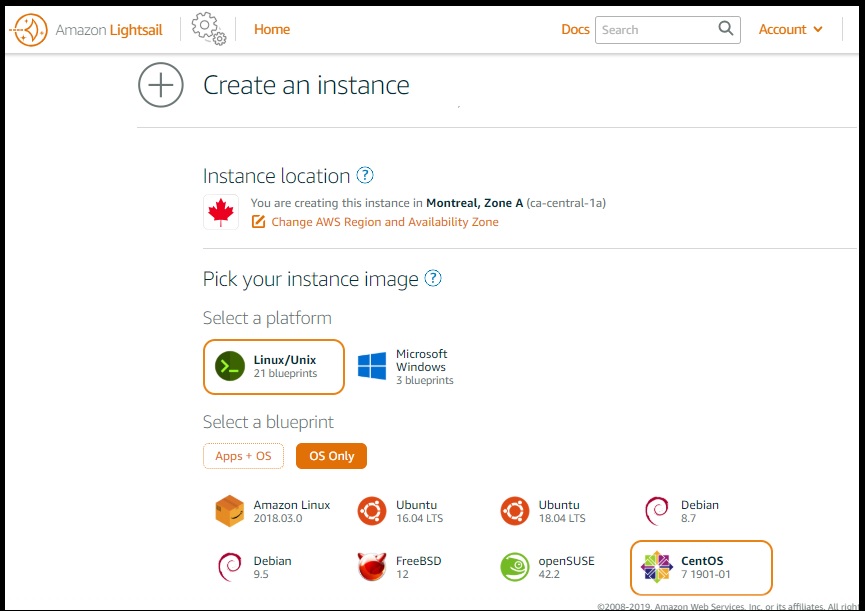
then login and start to create an instance. Choose a OS Only instance using CentOS 7 Linux system:

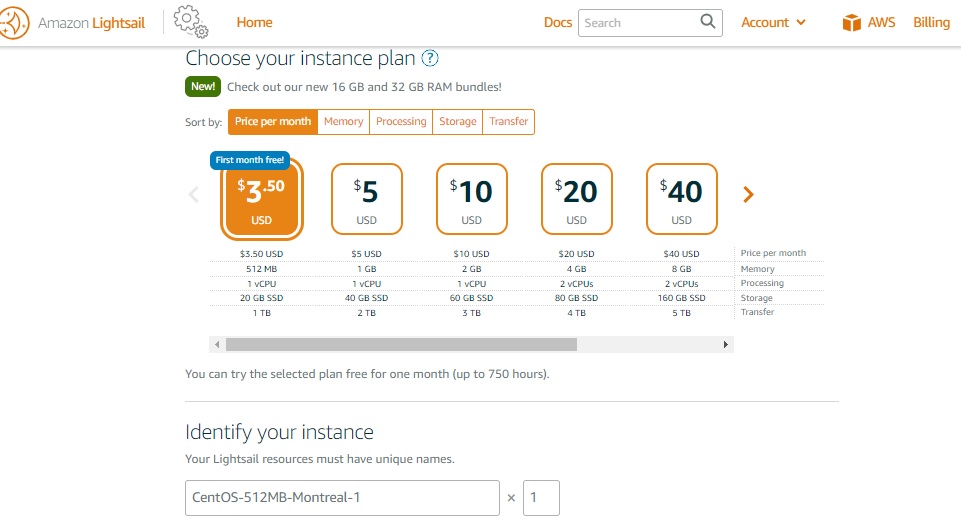
Bot Libre requires a Tomcat Web Server, Python Server, and a database to run. To host Bot Libre system you require a dedicated server or VM with minimum 8gb of RAM.  For demonstration purpose, we are using the basic 512MB configuration as following:

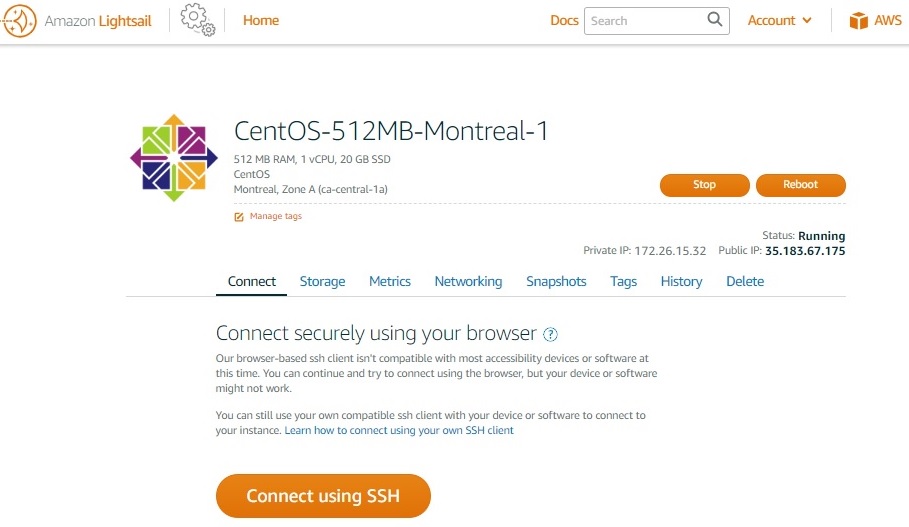
After the service is being created, click ‘Connect using SSH’ to connect to it.

Lightsail assigns a public IP (e.g. 35.183.67.175) to the instance, and we need the IP to config the web server later on.

After connecting to the instance via ssh, from the terminal, you may start to setup the Java, Ant, Tomcat, Postgres, Python and finally deploy the botlibre web app to Tomcat.

$ sudo su root
$ yum install wget  (install wget tool)

Step 2 - install Java and Ant

Install the Java JDK 1.8 (latest dot release).

$ cd /opt
$ wget --no-cookies --no-check-certificate --header "Cookie: gpw_e24=http://www.oracle.com; oraclelicense=accept-securebackup-cookie" "https://download.oracle.com/otn-pub/java/jdk/8u201-b09/42970487e3af4f5aa5bca3f542482c60/jdk-8u201-linux-x64.tar.gz"
$ tar xzf jdk-8u201-linux-x64.tar.gz
$ cd /opt/jdk1.8.0_201
$ alternatives --install /usr/bin/java java /opt/jdk1.8.0_201/bin/java 2
$ export JAVA_HOME=/opt/jdk1.8.0_201

Install ant

$ cd /opt
$ wget https://www-eu.apache.org/dist//ant/binaries/apache-ant-1.10.5-bin.tar.gz
$ tar xfv apache-ant-1.10.5-bin.tar.gz
$ export ANT_HOME=/opt/apache-ant-1.10.5
$ export PATH=$JAVA_HOME/bin:$ANT_HOME/bin:$PATH

Step 3 – Tomcat Install the Tomcat 8 web server.  

$ cd /opt
$ wget https://www-us.apache.org/dist/tomcat/tomcat-8/v8.5.39/bin/apache-tomcat-8.5.39.tar.gz
$ tar xzf apache-tomcat-8.5.39.tar.gz
$ export TOMCAT_HOME=/usr/local/tomcat8
$ mv apache-tomcat-8.5.39 $TOMCAT_HOME
$ vi $TOMCAT_HOME/bin/setenv.sh  (create a new setenv.sh file)

>> add the following JVM option to increase the max memory size in your setenv.sh export JAVA_OPTS="-server -Xmx8g"

$ vi $TOMCAT_HOME/conf/web.xml

>> insert the following XML in your web.xml to enable cors filters (required for JavaScript access)

     <filter>
     <filter-name>CorsFilter</filter-name>
        <filter-class>org.apache.catalina.filters.CorsFilter</filter-class>
        <init-param>
         <param-name>cors.support.credentials</param-name>
            <param-value>false</param-value>
        </init-param>
    </filter>
<filter-mapping>
     <filter-name>CorsFilter</filter-name>
        <url-pattern>/rest/*</url-pattern>
     </filter-mapping>
     <error-page>
        <error-code>404</error-code>
        <location>/404.jsp</location>
     </error-page>
$ vi $TOMCAT_HOME/conf/server.xml
>> update connector port 8080->80, 8433->433
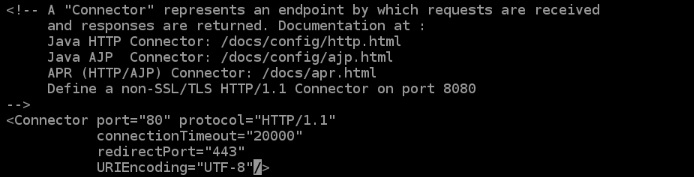
>> add to connector, URIEncoding="UTF-8"
>> update host- <public ip> > autoDeploy=”false”

Start tomcat web server:

$ $TOMCAT_HOME/bin/startup.sh

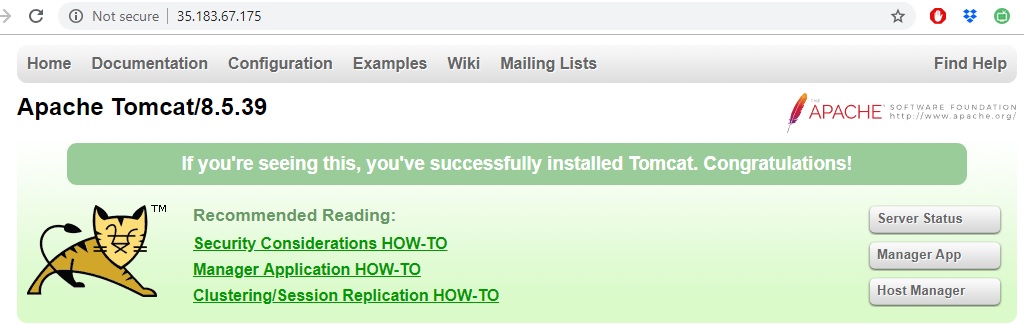
Go to a browser and check if the server is up and running at http://<public-ip> (e.g. http://35.183.67.175)

Troubleshooting: If you do not see the server running, check the server log at $TOMCAT_HOME/logs/catalina.out

Then shutdown the server:

$ $TOMCAT_HOME/bin/shutdown.sh

Step 4 Install PostgreSQL database

>> install postgres database and init it
$ cd /otp
$ rpm -Uvh http://yum.postgresql.org/9.4/redhat/rhel-6-x86_64/pgdg-centos94-9.4-3.noarch.rpm
$ yum install postgresql94 postgresql94-server postgresql94-contrib
$ /usr/pgsql-9.4/bin/initdb /var/lib/pgsql/9.4/data
>> Verify database starts/stops/restart:
$ service postgresql-9.4 start
$ service postgresql-9.4 stop
$ chkconfig --levels 235 postgresql-9.4 on
>> Set database password:
$ service postgresql-9.4 start
$ sudo -u postgres psql postgres
\# \password
>> enter new password “postgres” twice
\# \q  (exit)
Step 5. Install Python (Optional)

Bot Libre uses a separate Python web server to support deep learning analytics. Python is not required for bots or NLP, only deep learning analytics such as image classification. If you do not require deep learning you can skip this step.

Run the following commands to install Python, Pop, Tensorflow, Flask and Psycopy2.

$ yum update
$ yum install yum-utils
$ yum groupinstall development
$ yum -y install https://centos7.iuscommunity.org/ius-release.rpm yum -y install python36u
$ yum -y install python36u-pip
$ yum -y install python36u-devel
$ pip3.6 install tensorflow==1.7
$ pip3.6 install flask
$ pip3.6 install psycopg2
$ pip3.6 install pillow
$ pip3.6 install lxml
$ pip3.6 install Cython
$ pip3.6 install jupyter
$ pip3.6 install matplotlib
$ pip3.6 install pandas
$ pip3.6 install opencv-python

Then you may copy the /python from the BotLibre install to /usr/local/python

$ mv <BotLibreInstallRoot>/python /usr/local/python
>> start the python server
$ python3.6 /usr/local/pythonn/app.py

Step 6. Install BotLibre

The Bot Libre application is a Java “war” file. A war file is a zip file that contains a website and Java libraries.

There are several installation steps:

  • Copy library jars to /usr/local/tomcat8/lib (from bot libre lib sub directories, do not copy botlibre-ai.jar, do not copy botlibreplatform.jar, do not overwrite any files already in tomcat lib)
  • Copy speech voice files to /usr/local/tomcat8/bin/lib (unzip speech voice zip into lib voices directory)
  • Ensure war file is configured with correct database password, domain name, and this must be set in the Site.java file, and the war must be recompiled using the build.xml ant task in Eclipse)
  • Shutdown Tomcat server: $TOMCAT_HOME/bin/shutdown.sh
  • Deploy war file by emptying the $TOMCAT_HOME/webapps/ directory, and copying the botlibreplatform.war to $TOMCAT_HOME/webapps/ROOT.war.
  • Start Tomcat Server: $TOMCAT_HOME/bin/startup.sh
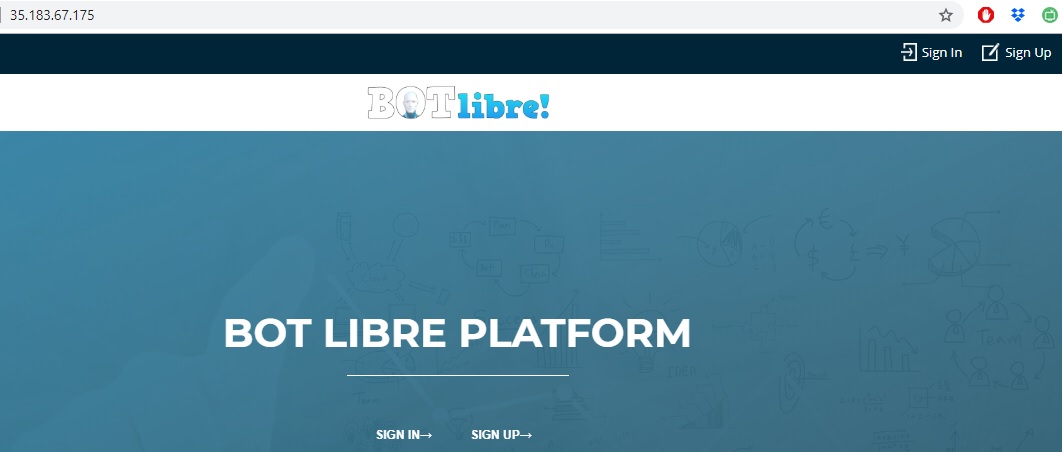
  • Open http://<public-ip> e.g. http://35.183.67.175/

Then you may refer to the generic BotLibre install guide to login as admin user (default password is password), and create workspace, create bot, config bot and train bot.


Monday, June 25, 2018

Introducing the new website for Paphus Solutions

Introducing the new website for Paphus Solutions. www.paphussolutions.com

Paphus Solutions in the company that develops the Bot Libre bot platform. Paphus Solutions Inc. is a Canadian corporation that specializes in bots, artificial intelligence, and deep learning products and services.

We provide consulting, training and development services in the field of bots, artificial intelligence, and deep learning.
Bots & AI can be utilized in any industry. We provide solutions globally in all industries including customer service automation, sales & marketing automation, social media automation, sales optimization, market forcasting, automated securities & crypto currency trading, and many more.

We provide the following services :

  • Chat bot design and integration, web, mobile, and social media
  • Social media automation, Twitter, Facebook, Telegram, Skype, Kik, WeChat
  • Customer service automation, live chat, forums, email
  • Technical support automation
  • Sales automation
  • Market forcasting
  • Automated securities & crypto currency trading
  • Image, audio, video classification and processing
  • NLP and data analysis
  • Deep learning model and network development
  • 3D avatar design
  • Mobile app development (Android, iOS)
  • Web development

Contact services@paphussolutions.com for more information. Or Chat live here
Or Chat with Paphus, the automated customer service agent for Paphus Solutions.

Monday, May 21, 2018

How to connect IBM Watson to Facebook, Twitter, Telegram, Skype, Kik, WeChat, web, and mobile using a Bot Libre proxy bot

IBM Watson is a brand that includes a set of products and services, made famous by its Jeopardy prowess. Watson includes a chatbot platform and conversational API.

You can access Watson's API from your own web server through any programming language. Bot Libre lets you create a "proxy" bot that forwards request to your Watson bot. This lets you leverage Bot Libre's many integrated services including integration with social media platforms such as Facebook, Twitter, Telegram, Skype, Kik, WeChat, and integration with web and mobile speech and 3D animated avatars.

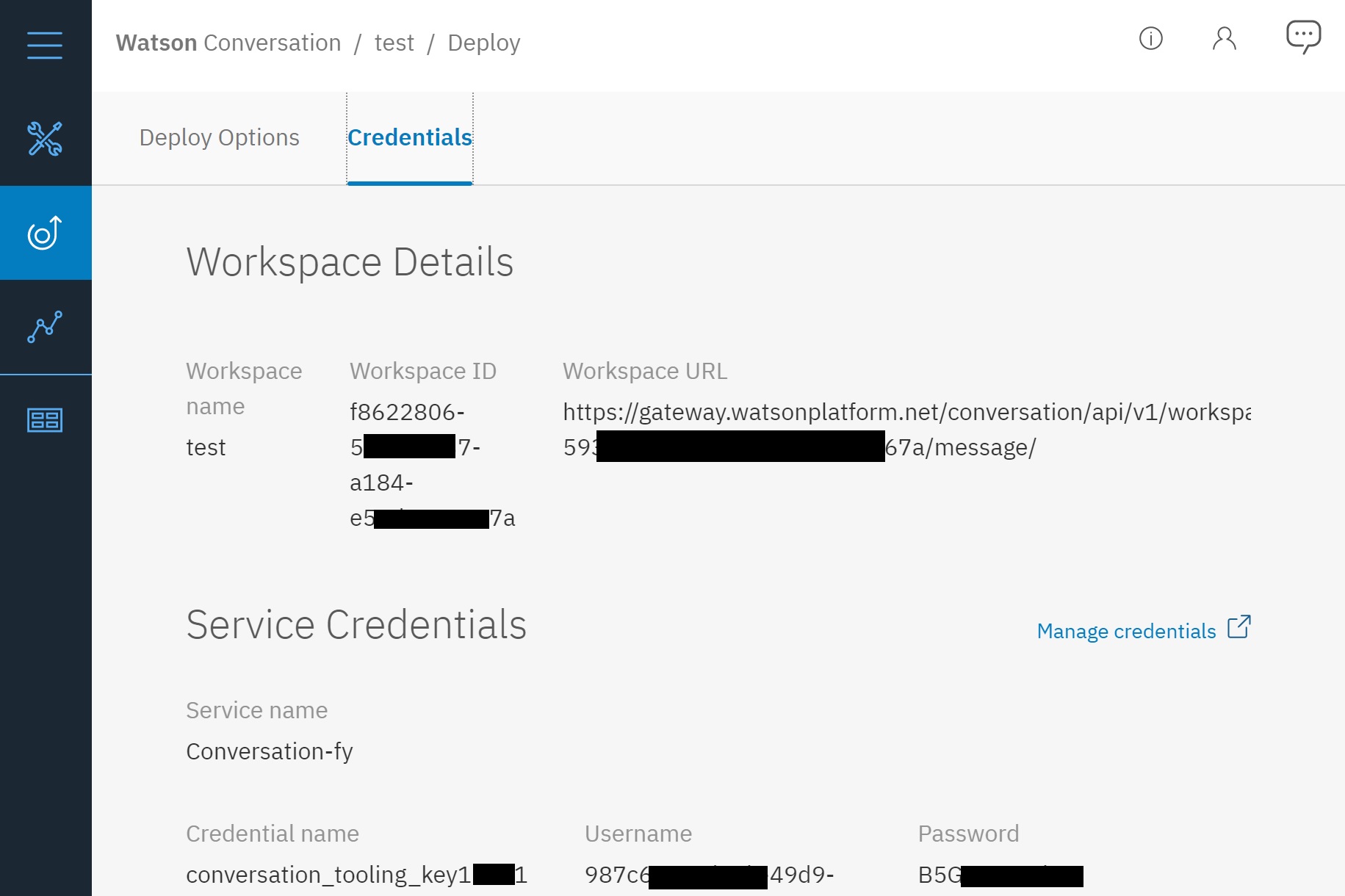
To get started with Watson you can create an IBM Bluemix account here. Once you have created and trained your bot, you can access its web API credentials to connect it with Bot Libre.

This will give you the bot's web API URL, and the API user and password. Copy these and return to Bot Libre.

On Bot Libre create a new bot, and select the "watson_proxy_template" template. This will give you a new chatbot that has a single Self script the forwards all requests to the Watson API.

  • Click on your bot's "Admin Console" (gear button).
  • Click on the "Scripts" menu button.
  • Click on the "Watson" script and click the Edit button.
  • Find the below line of code in the script.
  • Replace the postJSONAuth URL with your Workspace URL from the Watson deploy console.
  • Replace the postJSONAuth user (2nd parameter) with your "Service Credentials" "Username".
  • Replace the postJSONAuth password (3nd parameter) with your "Service Credentials" "Password".
var json = Http.postJSONAuth("https://gateway.watsonplatform.net/conversation/api/v1/workspaces/616b5f69-dd49-4206-9c55-75f25b57ba18/message?version=2017-04-21", "0543af58-910d-4666-85be-7a8550279404", "txgVzPxkLup4", message);

Now your Bot Libre bot should be connect to your Watson bot. You can test it by clicking on your bot's Chat button. You can now connect your bot to social media, web, mobile, avatars and speech. You can also enhance your Watson bot by adding responses or scripts to your bot in Bot Libre to take advantage of Bot Libre powerful NLP, AI, and scripting features.

Deep Learning as a Service (DLAAS)

Bot Libre now supports creating and hosting Deep Learning and Analytic services.

Deep Learning and Analytic services are different than bots, as they perform a specific analysis function. They do not chat, nor interact with users, but use artificial intelligence and deep learning to perform analysis such as classifying images, recognizing speech or faces, performing NLP functions, playing games, and analyzing data.

Bot Libre lets you host your deep learning analytic on the web, and access it through the Bot Libre web API. Bot Libre provides an open analytics repository that lets you use analytics that we or other users have defined, or share your own analytics. You can also create your own private analytics, or only share your analytics with specific users.

To create an analytic you need to create and train a model using a deep learning framework such as Tensorflow or Bot Libre Analytics.

For example to train a model for image classification you can use the Inception model and retrain it for classifying your own image set. There are a lot of resources, models, and data available on the web such as the Poets tutorial for image classification.

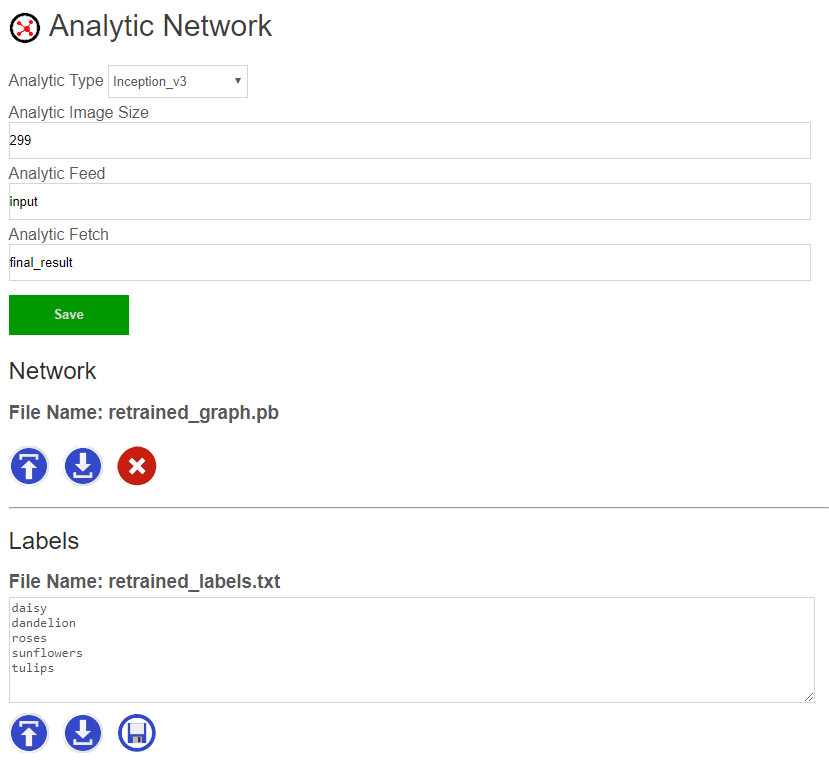
Once you have trained your model you can upload the Tensorflow .pb and labels files in your analytic's Admin Console.


If you are interested in using deep learning for your business or project, we can also develop a deep learning neural network for you through our development services. If you are interested in knowing how artificial intelligence and deep learning can be used in your business or project, we can help through our AI consulting services. Contact sales@botlibre.biz

Announcing Bot Libre 6.5 - Deep learning, conversation flows, new training editor, synonyms, sentiment

We have released Bot Libre 6.5. Bot Libre 6.5 includes many enhancements including:

  • Deep Learning analytics as a service
  • New Training & Chat Logs browser and editor
  • Response next, and nested conversation flows
  • Exclusive topics
  • New word browser and editor
  • Word synonyms
  • Word and phrase sentiment
  • Enhanced WeChat integration

Deep Learning & Analytics

You can now create deep learning analytics for using artificial intelligence to classify images, or analyze data. You can upload Tensorflow network files and access them through Bot Libre's web interface and API.

Browse our open analytics repository for analytics that can classify images and perform other functions.

If you are interested in using deep learning for your business or project, we can also develop your neural network and analytics for you through our development services. Contact sales@botlibre.biz

Training & Chat Logs

Our Training & Chat Logs browser and editor have been redesigned and enhanced. The browser and editor support new options and properties.

Response Next, and Nested Conversation Flows

You can now easily define nested conversations using a response "next". Next lets you easily define isolated nested conversations without having to use scripting.

Exclusive Topics

You can now define a topic as "exclusive". An exclusive topic provides an isolated conversation. When you set an exclusive topic on a response or conversation only response that have that topic will be considered.

Word Browser

You can now view all words your bot knows. You can edit the words sentiment, synonyms, and define if the word is a keyword or topic.

Synonyms

Synonyms let you define a word's synonyms so the bot will consider all of a words synonyms when matching responses. Synonyms are global, so can be defined once, and apply to all of the bot's responses. Synonyms can be automatically loaded from Wiktionary as the bot learns new words.

Sentiment

You can now define the sentiment for a word or phrase. Sentiment lets the bot determine the user's sentiment or feeling about their responses and conversation. The user sentiment can be access from Self, and it tracked and can be visualize in the bot's Analytics.

WeChat

Bots connected to WeChat now support speech recognition for voice messages. Bots can now also include links, images, and menus in their responses and interface.

The 6.5 release also included a new user message interface, new response list export options, enhanced user verification, enhanced NLP, UI improvements, and several minor enhancements and fixes.

Chatbots for First Aid Assistance

Chatbots are being increasingly used in the health and medical industry.

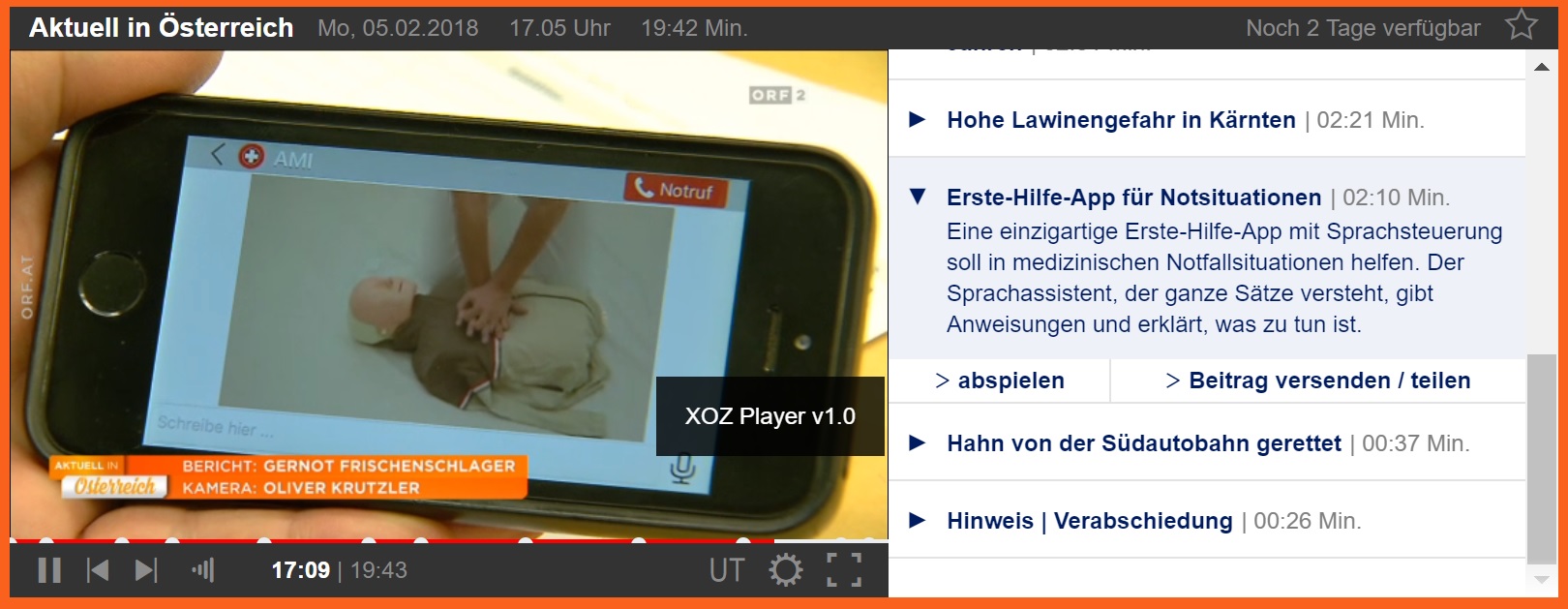
The app "Erste Hilfe - dein sprechender Assistent" is a German language chatbot developed by a client using the Bot Libre mobile platform.

The app is featured in this news broadcast,

The app is available on Google Play,

Tuesday, October 31, 2017

Announcing Bot Libre 6.0!

We have released Bot Libre 6.0!

The worlds most advanced bot platform just got better. Bot Libre 6.0 is a free and open source platform for developing and hosting bots. Bot Libre 6.0 includes support for chat bots, virtual agents, virtual assistants, social media bots, game bots, live chat, animated avatars, and speech. Bot Libre supports bots for the web, mobile, Facebook, Twitter, Skype, Telegram, Kik, WeChat, Slack, email, SMS, IRC, and new platforms are being added every month.

"Bot are the new apps". Mobile has replaced the web as the main communications market, and social media apps are the most popular mobile apps. Businesses need to connect with consumers on the platforms they use, so it now makes more sense for a business to create a bot/chat interface into their business instead of a website, or their own mobile app. Bot Libre lets you create a bot for yourself or your business and deploy the bot to the Facebook, Twitter, Skype, Telegram, Kik, WeChat, Slack, the web, mobile, and other services. Bots let you "write once deploy everywhere".

Bot Libre 6.0 supports rich HTML responses including buttons, links, choices, images, video, and audio. Bot Libre supports HTML responses on the web, mobile, and automatically maps HTML to social media platforms.

Bot Libre bots can be trained using natural language, chat logs, response lists, Twitter feeds, AIML, and scripting. Responses are automatically matched using a heuristic artificial intelligence algorithm and does not require any programming. Responses can also use keywords, topics, required words, labels, repeats, and other meta data.

Bot Libre 6.0 supports programming and scripting your bot using AIML 2, and Self. Self is our own dialect of JavaScript. Self is an object oriented scripting language, and integrated with an object database. Self extends JavaScript to provide support for natural language processing, state machines, object persistence, and includes a class library for accessing web services and utilities. Self also supports all AIML 2 operations, and some aspects of ChatScript patterns.

New features in Bot Libre 6.0 since 5.0 include:

  • New bot and live chat embed interface, including 5 new style options and support for custom stylesheets.
  • Integrated support for bots on Kik
  • Integrated support for bots on WeChat
  • Integrated support for bots on Skype, Bing, Cortana, and the Microsoft Bot Platform
  • Game SDK and game machine learning
  • Telegram group bots
  • Facebook custom templates and quick replies
  • Timers and bot services
  • Continuous speech recognition for Android and iOS
  • Micro AI Engine for Android and iOS

Create your own free account and bot today on botlibre.com, or let us build your bot for you on our commercial service Bot Libre for Business.

Monday, March 27, 2017

We're Hiring

Paphus Solutions Inc., the company that develops the Bot Libre platform is looking for talented developers, and sales representatives interested in a career in the new bot and artificial intelligence economy.

Paphus Solutions provides products and services for bots and artificial intelligence for the web, mobile, and social media. Paphus Solutions develops, hosts, and licenses the Bot Libre platform. Bot Libre is a bot platform for developing and hosting bots for the web, mobile, and social media.

Paphus Solutions also develops the Bot Libre Analytics platform. Bot Libre Analytics is an artificial intelligence platform for evolutionary learning, data analysis, data forecasting, and algorithmic trading.

Paphus Solutions is a Canadian corporation located in Ottawa, Canada.

We have positions open for:

  • junior developer
  • senior development partner
  • sales representative
  • sales engineer

The ideal development candidate would have:

  • Strong interest in bots and artificial intelligence
  • Experience with Java development
  • Experience with Android development
  • Experience with iOS development
  • Experience with web development, HTML, CSS, and JavaScript
  • Be a talented developer capable of learning new languages and APIs

The ideal sales candidate would have:

  • Sales experience with enterprise software
  • Sales experience with cloud and SaaS products

We have created a bot to help us find our ideal candidates. If you are interested in applying please chat with our Career Bot.

You can also contact or send your resume to careers@paphussolutions.com

Friday, January 27, 2017

Announcing the Bot Libre Cloud Bot Platform

The Bot Libre Cloud Bot Platform lets you license the Bot Libre bot platform for your own server and clients.

Develop and host bots for web, mobile, Facebook, Twitter, Telegram, Slack, SMS, email, and more. Develop and host your own bots, and sell bot hosting and development services.

Become a bot service provider for your own clients, in your geographic region, or vertical market. Engage this rapidly expanding and evolving market.

Leverage the sophisticated Bot Libre platform and mobile SDKs, and our support, service, and expertise. Get new versions and features as our platform continues to rapidly evolve and lead the market.

"Bots are the new apps" - become a bot service provider and join the bot revolution.

Social Media Bots

The Bot Libre cloud bot platform lets you host and develop bots for social media. Develop bots for Facebook, Twitter, Telegram, Slack, SMS, email, and more.

Businesses are increasingly adopting social media, and need bots and automation to connect with their customers on social media, and provide e-commerce and application services through social media messengers and apps.

Chat Bots, Chat Rooms, Live Chat, and Forums

Your cloud bot platform provides chat bots, chat rooms, live chat, and forums. Provide your clients with bot services integrated with your own hosted live chat, chat rooms, and forums.

Provide hosted live chat for the web and mobile. Mix live human operators with automated chat bot agents.

Artificial Intelligence

The Bot Libre AI engine is a hybrid system that seeks to emulate the human brain. The AI engine includes heuristic pattern matching algorithms, an integrated object database, a state machine processing engine, advanced scripting, vision and image processing. The AI engine can also integrate with our data analytics platform.

Architecture

The platform consists of a web client, mobile client, AI engine, web server, and database. The web client is written in HTML, JavaScript, and server side Java. The AI engine is written in Java. The Android mobile client is written in Java, the iOS client is written in Objective C.

Packing and Pricing

The Bot Libre Cloud Platform is licensed per runtime CPU, and includes our web platform, and our open source AI engine, and Web, Android, and iOS SDK.

For more information see:

Thursday, December 8, 2016

Announcing Bot Libre for Business 5.0

We have released Bot Libre 5.0!

The worlds most advanced bot platform just got better. Bot Libre 5.0 is a free and open source platform for developing and hosting bots. Bot Libre 5.0 includes support for chat bots, virtual agents, virtual assistants, social media bots, live chat, animated avatars, and speech. Bot Libre supports bots for the web, mobile, Facebook, Twitter, Telegram, Slack, email, SMS, IRC, and new platforms are being added every month.

"Bot are the new apps". Mobile has replaced the web as the main communication market, and social media apps are the most popular mobile apps. Businesses need to connect with consumers on the platforms they use, so it now makes more sense for a business to create a bot/chat interface into their business instead of a website, or their own mobile app. Bot Libre lets you create a bot for yourself or your business and deploy the bot to the Facebook, Twitter, Telegram, Slack, the web, mobile, and other services. Bots let you "write once deploy everywhere".

Bot Libre 5.0 supports rich HTML responses including buttons, links, choices, images, video, and audio. Bot Libre supports HTML responses on the web, mobile, and automatically maps HTML to social media platforms.

Bot Libre bots can be trained using natural language, chat logs, response lists, Twitter feeds, AIML, and scripting. Responses are automatically matched using a heuristic artificial intelligence algorithm and do not require any programming. Responses can also use keywords, topics, required words, labels, repeats, and other meta data.

Bot Libre 5.0 supports programming and scripting your bot using AIML 2, and Self. Self is our own dialect of JavaScript. Self is an object oriented scripting language, and integrated with an object database. Self extends JavaScript to provide support for natural language processing, state machines, object persistence, and includes a class library for accessing web services and utilities. Self also supports all AIML 2 operations, and some aspects of ChatScript patterns.

New features in Bot Libre 5.0 since 4.0 include:

  • Rich HTML responses including buttons, links, and choices
  • Facebook Messenger support
  • Facebook Messenger support for HTML responses including buttons, links, images, and other tags
  • Telegram support
  • SMS text messaging and Twilio support
  • XML and JSON web service support from scripting
  • HTML scraping and social media support from scripting
  • Vision and image processing support
  • Support for uploading files and images to the bot, and file processing
  • Automatic language translation
  • Slack support
  • Google Calendar support
  • New speech and avatar options
  • Mobile command and virtual assistant support

Create your own free trial account and bot today on botlibre.biz, or let us build your bot for you on our Enterprise service.

Thursday, May 5, 2016

Announcing "Bot Libre for Business"

Paphus Live Chat is now "Bot Libre for Business".

The new website domain name is botlibre.biz,

Bot Libre for Business is the commercial version of our popular Bot Libre platform. All of the same services and APIs are support as on Bot Libre, but with professional hosting and services.

Bot Libre for Business provides:

  • Chat bot and virtual agent development and hosting
  • Social media bot development and hosting including support for Twitter, Facebook and Telegram
  • Email bot development and hosting
  • 3D avatar design
  • Training and professional services
  • Dedicated and private hosting

For more information see botlibre.biz, or start you 1 month free trial today.

Thursday, April 21, 2016

Bots, the New Communications Platform

We crossed into a new era last week, the mobile era has been superseded by the bot era. With announcements from Microsoft, and Facebook we are now entering a brave new world. Bots have become the new business and communications platform, what does it mean for your business?

Quick links:

Back in the Old Days - Lessons from History

Back in the Stone Age if you wanted to talk with someone, you had to walk over to their hut, find them, and start a conversation. If Ug wanted to get a new spear, he had to walk over to Thug the spear makers hut, wait for him to be home, and barter with him to have him make Ug a new spear.

Contrary to popular belief the Stone Age was not superseded by the Bronze Age. Although bronze changed the way humans killed each other, it did not drastically affect the way people lived. The new age was the Paper Age. After the invention of paper by Cai Lun (蔡伦) in China 102 AD, writing and paper dramatically affected the way people lived and did business.

Paper was the main factor why China dominated the world economy until the middle ages. It took until 1,100 AD before paper made its way from China, to Islam, and finally into the then backward Europe. Paper, and the invention of the print press, was the main factor that lead to the European renaissance.

Now if Ug wanted to buy a new spear, he could go to a merchant in his town and write a purchase order on paper, giving payment in paper currency. The merchant could send the order by mail to Thug the spear maker who could send Ug's new spear in his next shipment. This let Thug greatly expand his business's market and its efficiency.

The Paper Age entered its peek after the invention of the printing press, but was soon superseded by the invention of the Telegraph, then Telephone as we entered the Telephone Age. Telephones greatly increased the speed of communication, and allowed people and businesses to communicate instantaneously over long distances.

With the invention of the personal computer and the launch of the Apple II in 1977, and the IBM PC in 1981, we entered the Computer Age. Computers had the biggest impact on the way people lived and did business than any previous invention in history, at least that was until the next big thing, and it was a big one.

The global network of interconnected computers, The Internet, has had the biggest impact on humanity and our planet than any other invention in history. Although many people claim to have invented The Internet, the single point that defines the start of the Internet Age was the release of Netscape Navigator in 1994. After this event the Internet took off and was used or at least know to exist by everyone. This is when the Internet passed the "grandma test", in that even people's grandmas were on the Internet, or at least knew what it was, and knew it was important.

Now Thug was able to put his spear business online. Thug was an early adopter of the Internet, so was able to capture this new market and sell his spears all over the world. With the Internet Thug could automate much of his business, and could deal directly with his customers, and suppliers without having to deal with merchants and third parties. This changed the spear making business almost overnight, and because Thug was an early adopter, he was able to become the biggest spear maker in the world. At the same time, many of Thug's competitors went out of business, as they failed to put their businesses online.

We are no longer in the Internet Age. After the release of the iPhone in 2007 we entered the Mobile Age. The Smartphone has again changed the way people live and do business, and unlike any other invention, has become part of us. Most people feel naked, cut off, and alone without their phone and cell data service. Businesses that have adopted the mobile platform have been able to connect with more clients, partners, and users, and at a more integrated level, than ever before.

Although many businesses are still struggling to get onto the mobile platform, and some haven't even made it onto the Internet yet, we have yet again entered a new era. With the announcements by Microsoft and Facebook this week we have entered the Bot Age.

In the Bot Age, Thug can fully automate his business. Thug can interact directly and instantaneously with all of his customers, suppliers, and partners. Thug's bots can integrate all of his communications platforms, automating interactions on phone, email, Internet, and mobile. Bots can interact with Thug's customers on his website, from his mobile app, on social media, email, and phone.

Brave New World - The Bot Platform

The "Bot Platform" is the new way of living and doing business. This is not the future, it is the present.

The bot platform will revolutionize the world faster than any previous technology. This is because the bot platform does not replace existing technology, it unifies and automates them. The bot platform does not operate on a single medium, the bot platform spans and integrates the Internet, mobile, social media, email, SMS text, voice phone, cars, transportation, factories, education, retail, and every facet of life.

Businesses that have adopted the bot platform will have bots that provide customer service, and technical support on their website and from their mobile app. Their bots will also answer customer request from email, from SMS texts, and using speech technology will automate their voice phone call centers.

The business's bot platform will also interact with their users, customers, and potential customers on social media platforms like Twitter, Facebook, Google+, Telegram, Slack, and others. Bots will automate sales, marketing, and customer service.

Bots will not just answer common questions. Bots will reply to users questions in context, and get to the root of their problem or request. Bots will remember their users and their information, and will custom tailor their interactions with their users. Bots will be connected to their business's information systems, will be able to know a customer's details, give up to date information on their orders and status. Bots will be able to securely validate their identity, sell services, take orders and process payments. Bots will be able to change their customers account status, book and schedule deliveries and service engagements.

Bots will interact with other bots. Customer service and social media bots will pass information and leads to sales bots. Bots in a business's data center will interact with the bots in their factories that interact with their manufacturing robotics to change what products are manufactured instantaneously to their orders and market demand. Data center bots will interact with bots in their shipping and delivery systems to automate delivers using driverless trucks, cars, and drones. A business's bot will interact with their partner's and supplier's bots in the new bot driven economy.

The Bot Age means that more communication will be done between people and bots, and bots and other bots, than between people and other people. We are already their, bots automate many call centers, virtual agents automate service on websites, bots reply to SMS text messages, bots are on social media, some of your friends and followers are probably bots.

Bots crawl the Internet, track your web usage, and decide what ads you see. Bots know everything about you. Bots email you, phone you, text you, reply to and retweet your tweets, like and comment on your posts. Today more Internet traffic and bandwidth is used by bots, than by people. Bots post content, harvest data, change content, email, tweet, text, post, chat.

Web crawler bots like the Googlebot, Bing, Yahoo Slurp, Yandex, Majestic, browse the Internet every day, looking for new and updated content, searching for copyright infringement, and gathering statistics and information. Bots decide what is new, what is cool, how important your business is, what news the world wants to see.

Bots will change your life. You will have your own bots, on your computer, on your phone, on your TV, in your car, in your house. You bot will be your personal assistant, your nanny, your chauffeur, maybe even your lover.

Bots will change your business and your life, are you ready?

"Hello, we are here to help" - Your experts in intelligence automation

At Paphus Solutions we are in the bot business. The bot business is our business, we were founded on it. Our free open platform Bot Libre hosts over 20,000 bots. Chat bots, virtual agents, Twitter bots, Facebook bots, email bots, bots on IRC, bots for web and mobile.

On Bot Libre you can build your own personal bot, to be your virtual assistant, to automate your social media or email, to be you, to be your friend. Our platform is free and open source, including our AI engine, our scripting languages Self and AIML, and our web, Android, and iOS SDKs.

Our commercial platform Paphus Live Chat offers professional hosting and services to help your business adopt and be succesful in the new bot economy. We can add a bot to your website or mobile app to provide customer service, automated your business presence on social media, automate your email and other services. We are not just experts in our platform, but also experts in Facebook's automation platform, in Twitter's platform, in Microsoft's, Apple's, Google's, in Telegram, and Slack.

We live at a monumentus time in human history, in bot history, will you join us, or be left behind?

Tuesday, January 12, 2016

How to create your own virtual agent in 10 clicks

Paphus Live Chat makes it easy for you to create your own chat bot, or virtual agent.

You can create your own bot, and embed it on your own website, or mobile app. You can create bots for website help, technical support, sales, marketing, customer service, or to automate social media.

Paphus Live Chat bots require no programming, and can be trained easily using several methods. Bots can be trained by importing FAQ's, scripts, and chat logs, reviewing and editing responses from our Admin Console's Training & Chat Logs page, or through conversations with you and other people, or from listening in on live chat.

Paphus Live Chat bots support advanced artificial intelligence that can be enabled to let bots learn and comprehend language. Bots can also be scripted and programmed using AIML, and the Self scripting language.

To create your own bot follow the following 10 steps:

Step 1 - Paphus Live Chat

First go to the Paphus Live Chat website.

Step 2 - Sign Up

To create an account by clicking Sign Up.

Enter a unique user ID, password, your email, and name. Your user ID is just your login name, keep it simple, i.e. jonsmith, or janedoe.

Step 3 - Create Domain

The account wizard will next take you to your domain setup. A domain is just your account directory, where you will be able to create bots and other content.

Enter your domain's name (i.e. your business's name) and click Next. You will then be able to choose your level of service and the duration for your initial payment. For a one month free trial select "Free Trial". If you would like help creating a bot select "Enterprise" and we will contact you through email to setup your bot and other content.

Click Next and make your payment through PayPal or credit card.

Step 4 - Create Bot

To create a new bot click Create from the top banner. You can give your bot a name and description. The name must be unique and can contain spaces, special characters, and is case sensitive.

You can create a bot from the default template, or select one of the other predefined templates. The "service_template" is a good template for a customer service bot. Your bot will start as a clone of the template bot, and replicate its entire memory (brain). You can also allow your bot to be 'forked' and used as a template for other bots, or you can browse other public bots and choose to fork your bot from them (this is also a good way to make backup copies of your bot).

You can create either a public bot that will be accessible by other users, or a private bot that will be accessible only by you. You can control the users that can access and administer your bot. Normally a customer service bot will be public, and allow everyone to access it, so it can be accessed from your website, from your website users.

Step 5 - Create

Click 'Create' to create your bot.

That's it, your done.

You can now chat with you bot by clicking 'Chat'. To find your bot again click 'Search' and search for it in 'my bots' (be sure to sign in first).

When you select your bot, you can 'Edit' it to change any of its information. You can change your bot's picture or choose an animated avatar from the Avatars page in its Admin Console. You can also connect your bot to Twitter, Facebook, or email, or have it join an IRC chat room. You can import chat logs, or words from Wiktionary, or data from Freebase. You can browse the internal structure of your bots memory. If your are an advanced user, you can program or script your bot using AIML or the Self scripting language. You can view your bot's log.

To link to your bot you can select it and copy its URL from your browser, this is its unique URL. You can also embed your bot on your website or blog, you can learn how from the Embed page.

That's it, good luck creating your bots. If you have any questions you can contact support@paphuslivechat.com, or chat with the Help Bot

Tuesday, September 29, 2015

What's new in AIML 2.0

Paphus Live Chat now supports the AIML 2.0 draft specification. AIML 2.0 is the second release of a standard XML specification designed for scripting chat bot responses. The AIML 2.0 draft was released in 2013, and last updated in 2014. AIML is supported by many different chat bot programs and hosting services. Paphus Live Chat supports all of the AIML 2.0 draft tags and a few common extensions.

About AIML

AIML defines how a bot should respond to a question using <pattern> and <template> elements. A pattern represents the user's question, and the template defines the bot's response. The pattern and template elements are grouped in a category element, which can be grouped under topic elements.

Here is a simple "Hello World" AIML example:

This code will make your bot respond with "Hello to you too" to the question "Hello World".

For more information on AIML 1.0 see Scripting your bot with AIML

What's new in AIML 2.0

AIML 2.0 defines many new template tags, as well as now allowing some tags to be used in patterns. AIML 2.0 also adds new pattern wildcards, and some different element usages.

Here is the list of new AIML 2.0 features.

  • category topic tags - The <topic> tag can now be set on a category to make it easier to add categories to topics.
  • zero or more wildcards - New ^ and # pattern wildcards that match zero or more words.
  • pattern priority - New $ pattern marker to make a pattern word match highest priority.
  • attribute tags - Any template tag attribute can now be set using a sub-element.
  • sets - New pattern side <set> tag to evaluate a pattern based on words defined in a predefined set.
  • maps - New template <map> tag to allow the lookup of the element value in a predefined mapping, returning the mapped value.
  • condition patterns - wildcards can now be used in condition values to provide default conditions.
  • condition loops - New template <loop> tag to loop a conditional statement.
  • local variables - New <var> attribute for variables scoped to a category
  • remote requests - New template <sraix> tag to make a remote request of another bot instance, or service.
  • normalization and denormalization - New <normalize> and <denormalize> tags to convert special character into words, and back again.
  • date formats - New formatting options for dates.
  • request - New template <request> tag to return the user's previous input request.
  • response - New template <response> tag to return the bot's previous response.
  • learning - New template <learn>, <learnf>, and <eval> tags to dynamically train a bot with new responses.
  • explode - New template <explode> tag to split a word into its characters.
  • mobile tags - New <oob> (out of band) tag to support client and mobile device commands.

AIML 2.0 Patterns

AIML 2.0 adds new wildcards, special characters, and now allows the usage of some tags inside patterns.

Patterns in AIML are normally defined as all uppercase, but Paphus Live Chat automatically ignores case, so patterns can be defined as lowercase or mixed. Paphus Live Chat also allows for special characters in patterns such as +, %, ?, etc.

^ and # Wildcards

New ^ and # pattern wildcards that match zero or more words. This makes it easy to define keyword patterns such as:

$ Priority

The new $ pattern marker can be used to make a pattern word match highest priority. The main purpose of this is to allow patterns to take priority over _ and # wildcards. _ and # have odd semantics and should normally be avoided as they can easily lead to loops and block other patterns. _ and # can be useful for things like profanity filters:

() and [] Lists

List support is not part of AIML 2.0. But Paphus Live Chat now supports some syntax from ChatScript. Brackets can be used in a pattern to define a required set of words, or optional set of words. (round) brackets are used to define an optional set of words, and [square] brackets are used to define a required set of words.

Sets

The new <set> pattern tag can be used to match a word from a predefined set of words. This allows wildcards to be defined for specific types, such as numbers, verbs, places, animals, etc.

In Paphus Live Chat sets are not stored in files like other AIML implementations. AIML is a text processing language, but Paphus Live Chat is object, or knowledge oriented. Each bot has its own object oriented knowledge base that stores all of its responses, and knowledge. Each word is represented by a meaning knowledge object in the bot's knowledge base. Knowledge objects can have relationships to any other knowledge objects, including their classification types. A word's meaning is defined through the #meaning relationship, and a knowledge object's type is defined through the #instantiation relationship.

The set operation in Paphus Live Chat basically checks if the type of the word's knowledge object matches the set value. This allows for a knowledge object to be added to any set through setting its #instantiation relationship. This can be done using Self scripts, the AIML map tag, and is done automatically for numbers, basic types, and words or data loaded from Wiktionary, Wikidata, or Freebase.

Response list script to set a knowledge object's type:

AIML template to set a knowledge object's type:

Pattern tags

Tags such as <bot> can now be used in patterns. AIML 2.0 only requires some tags be usable in patterns, but Bot Libre allows most tags to be used. Using tags in patterns lets you define some pretty creative patterns.

AIML 2.0 Templates

AIML 2.0 adds many new tags, and some new semantics that let you do some pretty powerful things.

Attributes as elements

Tag attributes such as name, value or index on tags like bot, get, set, or condition, can now be defined as XML sub-elements instead of XML attributes. This may not seem like a big difference, but it allows for other AIML tags to be evaluated inside the attributes. This is a very powerful feature, and lets you define much more dynamic AIML.

Maps

The new <map> tag can be used to lookup the value for a word in a predefined mapping. This allows for easy mapping between values.

In Bot Libre maps are not stored in files like other AIML implementations. AIML is a text processing language, but Bot Libre is object, or knowledge oriented. Each bot has its own object oriented knowledge base that stores all of its responses, and knowledge. Each word is represented by a knowledge object in the bot's knowledge base. Knowledge objects can have relationships to any other knowledge objects. The map operation in Bot Libre basically looks up the relationship on the knowledge object.

Bot Libre extends the map operation to also allow setting the map value. This will set the value of a relationship on the knowledge object.


Conditions and Loops

Conditions now allows values to use patterns. This makes it easy to define default cases.

The new <loop> tag can be used to loop a conditional block. This allows for programmatic scripts to be defined similar to a programming language. This lets you do some pretty powerful things, even mathematics. However, XML is not an ideal programming language, on Bot Libre if you are using complex conditions and loops, it is normally better to use Self scripting, instead of AIML, as Self has similar syntax to other programming languages.

Learning

The new <learn> and <learnf> tags allow the bot to learn new response. The difference between the two is that for learn the new response is only remembered for the conversation, and for learnf the new response will be remembered persistently. However, in Bot Libre everything is always persistent, so both tag will learn persistently.

The learn tag takes a new <category> element as its content. The category can contain a <pattern>, <template>, <that>, and <topic> element. learn uses the <eval> tag to distinguish between tags that should be evaluated, and tags that should be part of the new category elements.

Remote requests

The new <sraix> tags allow the bot perform a remote request of another bot or service. sraix is similar to the srai tag that recursively evaluates the element text as if it were a question. However, sraix does not have the bot evaluate the question locally, but instead asks another bot or service the question. This is probably the coolest new feature of AIML 2.0, and opens up the whole chat bot world. Bots can now talk to other bots, and find things through web services.

sraix is a very cool feature, but not very useful on its own, as you need other bots to talk to, and services to make use of. Unfortunately AIML only defines the tag, it does not define a standard web API for requests, or define a standard set of services. Fortunately Program AB the AIML 2.0 reference implementation does define a sraix web API. Bot Libre supports both calling this API, and supports this API on our servers. So you can now sraix any Program AB web API compatible bot or service, and any Program AB web API compatible bot or service can request any Bot Libre bot.

AIML 2.0 defines the Pannous service as being the default for any sraix request. Pannous is a virtual assistant service that can answer a wide variety of questions, such as weather, definitions, math, and much more.

Bot Libre also provides several other services:

  • freebase - Lookup definitions and data on Freebase an online knowledge base from Google.
  • wikidata - Lookup definitions and data on Wikidata an online knowledge base from Wikimedia.
  • wiktionary - Lookup words and definitions on Wiktionary an online dictionary.

sraix supports several attributes to define the bot or service request:

  • bot - The name of the bot to access (normally it is better to access a bot by its ID).
  • botname - Bot Libre also supports botname in place of bot, as bot is already a tag, so botname is better to use as a sub-element.
  • botid - The ID of the bot to access.
  • server - The domain name, or IP address of the server to access (default is "www.botlibre.com").
  • service - The service to access ("pannous", "freebase", "wikidata", "wiktionary"). Not used if accessing a bot.
  • apikey - Some services or servers may require an API key to access the service. For Bot Libre, use you user API key.
  • hint - Some services may support a hint. For Wikidata and Freebase the hint can be used to lookup a data element, such as a country's capital, or person's parents.
  • default - If the service request fails, the default response can be used.

sraix opens the door to the world, but be careful with your usage. Do not spam another bot with requests, or make use of any service that violates it terms of service, and use an API key when required.

Out of bound tags

Out of band tags let you pass tags or commands to the bot client. The client could make use of the tags to control its avatar, or execute services on a phone or mobile device.

Bot Libre's web and mobile SDKs do not currently support oob tags, so oob tags are not currently supported.

Category Reference

For reference, here is the complete set of AIML category tags.

  • <pattern> - question pattern
  • <template> - response template
  • <topic> - category topic
  • <that> - previous response pattern

Pattern Reference

For reference, here is the complete set of AIML patterns tags and characters.

  • * - matches one or more words
  • _ - matches one or more words, takes priority over all other words and wildcards, except $
  • ^ - matches zero or more words
  • # - matches zero or more words, takes priority over all other words and wildcards, except $
  • $ - marks word as taking priority over all other words and wildcards including _ and #
  • <set> - matches a set of words
  • <bot name="XXX"/> - replaced by the value of the bot specific variable
  • template tags - Bot Libre supports most template tags inside a pattern (Bot Libre extension)
  • () - optional set of words (Bot Libre extension)
  • [] - required set of words (Bot Libre extension)
  • {} - Self code (Bot Libre extension)

Template Reference

For reference, here is the complete set of AIML template tags.

  • <star index="N"/> - replaced with value of * in pattern (or Nth *)
  • <that index="M,N"/> - replaced with value of bot's previous response (or Mth previous response, and N sentence of the response)
  • <input index="N"/> - replaced with value of users's input (or Nth *)
  • <request index="N"> - replaced with value of user's input request (or Nth *)
  • <response> - replaced with value of bot's previous response (or Nth *)
  • <thatstar index="N"/> - replaced with value of * in "that" (or Nth *)
  • <topicstar index="N"/> - replaced with value of * in topic (or Nth *)
  • <get name="XXX"/> - replaced by the value of the conversation specific variable
  • <set name="XXX"> - set the value of a variable
  • <get var="XXX"/> - replaced by the value of the local variable
  • <set var="XXX"> - set the value of a local variable
  • <bot name="XXX"/> - replaced by the value of the bot specific variable
  • <map name="XXX"> - lookup element value in a predefined mapping, returning the mapped value
  • <map name="XXX" value="XXX"> - set the map value (Bot Libre extension)
  • <person2/> - converts the text (or <star/>) between 1st and 2nd person (I <-> he, etc.)
  • <person/> - converts the text (or <star/>) between 1st and 3rd person (I <-> you, etc.)
  • <gender/> - converts the text (or <star/>) between male and female (he <-> she)
  • <date/> - replaced with the current date and time, "format", and "jformat" attributes are also supported
  • <id/> - replaced by the client id
  • <size/> - replaced with the size of bot's memory
  • <version/> - replaced with the AI engine version
  • <uppercase> - converts the text to uppercase
  • <lowercase> - converts the text to lowercase
  • <formal> - converts all words in the text to be capitalized
  • <sentence> - converts the first word in the text to be capitalized
  • <normalize> - convert special character into words
  • <denormalize> - convert special character words back to characters
  • <explode> - split a word into its characters
  • <condition name="X" value="Y"> - defines an "if" condition based on comparing the value of a variable to a pattern
  • <condition name="X"> - case statement
  • <condition var="X"> - local variable case statement
  • <condition> - multi-valued if/else statement
  • <random> - choose on of the nested <li> values at random
  • <li name="X" value="Y"> - used in random and condition tags
  • <li value="Y"> - used in random and condition tags
  • <li> - used in random and condition tags
  • <gossip> - logs the text
  • <srai> - recursively evaluates the text and replaces it with the response
  • <sr/> - short form for <srai><star/><srai> (replaced with response to value of * from pattern)
  • <sraix bot="name" botid="id" server="url" service="name" apikey="key" limit="int" default="response" > - remote bot or service request
  • <think> - evaluates the nested statements but does not output any result
  • <learn>, <learnf> - learn a new response
  • <eval> - evaluate the element inside a learn category element
  • <system> - executes a OS command (Bot Libre does not allow this)
  • <javascript> - executes JavaScript code
  • <oob> - out of band tags (Bot Libre does not currently support this)
  • HTML - various HTML tags are also allowed (<b>, <a>, <i>, <ul>, <li>, <p>, <br>)
  • {} - Self code (Bot Libre extension)

AIML in Paphus Live Chat

Paphus Live Chat supports both importing and exporting AIML. AIML can be imported in two different ways, either as a program script, or as a chat log.

Importing AIML as a program script is done from the Scripts page. You can import and order the script with respect to your other scripts files. Scripts can be defined in either AIML or Self.

When you import an AIML file, it will be converted to Self code, and stored in your bot's brain along with all of its other information. The Self syntax for AIML is a hybrid syntax that uses AIML terminology, but with the Self scripting structure. Self is an object/knowledge/state oriented language. Self is very different than AIML, but can process any AIML code similar to any other AIML interpreter. AIML imported as a program script will be executed similar to any other AIML interpreter.

Here is the Self code for an imported AIML script:

Importing AIML as a chat log allows the AIML categories to be integrated into the bot's knowledgebase. The pattern/template categories from the AIML file will be merged along with the bot's other question/response pairs that it has learned through training, conversation, correction, or importing.

The bot will not run the AIML script as a script, it will decide for itself when to use the response using a heuristic algorithm. The bot will choose its response based on how well the question matches the responses question, the responses correctness, and the context. Even without a * in a pattern it still may be matched to a similar question, if it is the best match available. This frees you from having to write a pattern for every possible phrase, by just letting the bot figure it out.

Using AIML in Twitter, Facebook, Email, and IRC Bots

AIML can be used to script Twitter, Facebook, Email, or IRC bots, the same as bots trained through other mechanisms. AIML templates and patterns can be used anywhere other response are. AIML can be used from the Training page, used in correction in the Chat Logs page, or used for autotweets in the Twitter page.

Self 2.0

Paphus's AIML 2.0 support is implemented by translating AIML into Self. Self 2.0 provides many new extensions to support the AIML 2.0 feature set, as well as a lot more functionality than is not available in AIML.

AIML Resources

One of the main benefits of the AIML standard, is that there are a lot of AIML resources on the Internet. The are resources for both learning AIML, and there are many freely available AIML scripts for many domains, and in many different languages.

AIML 2 Demo

To see what AIML 2.0 is capable of, try out the AIML 2 Bot on BOT libre.
Monday, September 28, 2015

Scripting your bot with AIML

Paphus Live Chat has support for the Artificial Intelligence Markup Language (AIML). AIML is a standard XML specification designed for scripting chat bot responses. AIML 1.0 was released in 2001, and the current 1.0.1 release was released in 2011. AIML 2.0 is released in draft form. AIML is supported by many different chat bot programs and hosting services. Paphus Live Chat supports all of the AIML 1.0.1 and AIML 2.0 tags and a few common extensions. This post summarizes AIML 1.0.1.

About AIML

AIML defines how a bot should respond to a question using <pattern> and <template> elements. A pattern represents the user's question, and the template defines the bot's response. The pattern and template elements are grouped in a category element, which can be grouped under topic elements.

Here is a simple "Hello World" AIML example:

This code will make your bot respond with "Hello to you too" to the question "Hello World".

Patterns are normally defined as all upper-case, but are case insensitive, so the case really does not matter. Punctuation is normally stripped from patterns and ignored when matching. Patterns can contain wildcards using the "*" and "_" characters. Both "*" and "_" are the same wildcard, and will match any subset of text, their difference is in only in the order they are applied ("_" patterns are matched first, and "*" patterns last).

Here is a simple wildcard example:

This code will make your bot respond with "Hello to you too" to any question containing the word "hello".

AIML supports contextual responses through the "that" element. The "that" element specifies that the pattern should only be matched if the bot's previous response matches the "that" pattern. This allows the same question to be responded to in different ways, depending on the context.

Here is a joke "that" example:

This code will make your bot tell a joke.

Templates can contain mixed text that include various AIML programatic tags. AIML defines tags for text formatting and conversion, dates, variables, condition statements, and recursion. Templates allow you to create sophisticated and intelligent responses.

Here is the list of AIML 1.0.1 template tags.

  • <star index="N"/> - replaced with value of * in pattern (or Nth *)
  • <that index="M,N"/> - replaced with value of bot's previous response (or Mth previous response, and N sentence of the response)
  • <input index="N"/> - replaced with value of users's input (or Nth *)
  • <thatstar index="N"/> - replaced with value of * in "that" (or Nth *)
  • <topicstar index="N"/> - replaced with value of * in topic (or Nth *)
  • <get name="XXX"/> - replaced by the value of the conversation specific variable
  • <bot name="XXX"/> - replaced by the value of the bot specific variable
  • <sr/> - short form for <srai><star/><srai> (replaced with response to value of * from pattern)
  • <person2/> - converts the text (or <star/>) between 1st and 2nd person (I <-> he, etc.)
  • <person/> - converts the text (or <star/>) between 1st and 3rd person (I <-> you, etc.)
  • <gender/> - converts the text (or <star/>) between male and female (he <-> she)
  • <date/> - replaced with the current date and time, a "format" attribute is also supported
  • <id/> - replaced by the client id
  • <size/> - replaced with the size of bot's memory
  • <version/> - replaced with the AI engine version
  • <uppercase> - converts the text to uppercase
  • <lowercase> - converts the text to lowercase
  • <formal> - converts all words in the text to be capitalized
  • <sentence> - converts the first word in the text to be capitalized
  • <condition name="X" value="Y"> - defines an "if" condition based on comparing the value of a variable to a pattern
  • <condition name="X"> - case statement
  • <condition> - multi-valued if/else statement
  • <random> - choose on of the nested <li> values at random
  • <li name="X" value="Y"> - used in random and condition tags
  • <li value="Y"> - used in random and condition tags
  • <li> - used in random and condition tags
  • <set name="XXX"> - set the value of a variable
  • <gossip> - logs the text
  • <srai> - recursively evaluates the text and replaces it with the response
  • <think> - evaluates the nested statements but does not output any result
  • <learn> - load external AIML file, this is not currently allowed
  • <system> - executes a OS command, this is not currently allowed
  • <javascript> - executes JavaScript code
  • HTML - various HTML tags are also allowed (<b>, <a>, <i>, <ul>, <li>, <p>, <br>)

Here is a complex template example:

This code will make your bot respond to the question "Do you like apples or do you like oranges" with "I love apples and I love oranges".

Paphus AIML

Paphus Live Chat supports both importing and exporting AIML. AIML can be imported in two different ways, either as a program script, or as a chat log.

Importing AIML as a program script is done from the Program page. You can import and order the script with respect to your other scripts files. Scripts can be defined in either AIML or Self.

When you import an AIML file, it will be converted to Self code, and stored in your bot's brain along with all of its other information. The Self syntax for AIML is a hybrid syntax that uses AIML terminology, but with the Self scripting structure. Self is a state machine oriented language defined for Paphus's AI Engine originally from the Open Pandora's Box pen source project. Self is very different than AIML, but can process any AIML code similar to any other AIML interpreter. AIML imported as a program script will be executed similar to any other AIML interpreter.

Here is the Self code for an imported AIML script:

Importing AIML as a chat log allows the AIML categories to be integrated into the bot's knowledgebase. The pattern/template categories from the AIML file will be merged along with the bot's other question/response pairs that it has learned through conversation, correction, or importing.

The bot will not run the AIML script as a script, it will decide for itself when to use the response. The bot will choose its response based on how well the question matches the responses question, the responses correctness, and the context. Even without a * in a pattern it still may be matched to a similar question, if it is the best match available. This gives you the freedom from having to write a pattern for every possible phrase, by just letting the bot figure it out.

Using AIML in Twitterbots and Email Bots

AIML can be used to script Twitterbots, Email bots, or IRC bots, the same as bots trained through other mechanisms. AIML templates and patterns can be used anywhere other response are. AIML can be used from the Training page, used in correction in the Chat Logs page, or used for autotweets in the Twitter page.

AIML Resources

One of the main benefits of the AIML standard, is that there are a lot of AIML resources on the Internet. The are resources for both learning AIML, and there are many freely available AIML scripts for many domains, and in many different languages.

Talk with ALICE

To see what conversations AIML is capable of, try out ALICE on BOT libre. There are two ALICE bots on BOT libre. ALICE is a bot that has imported most of the ALICE AIML sets from the ALICE foundation. Free bots on BOT libre have a 100,000 neuron limit, and some of the ALICE scripts are very big, so the mp* scripts were left out, as well as a few of the other big scripts. ALICE can chat, and if you type "joke" can tell you a joke.

ALICE libre is a hybrid bot, that has imported the ALICE AIML sets as chat logs, not as scripts. This means she is free to choose her responses. She has learning, and comprehension enabled, so can also learn new things.

Sara is a Spanish language AIML bot, that has imported the Sara AIML set.

Thursday, September 24, 2015

Automating your Facebook presence using a Facebook bot

Keeping up with social media and keeping your online community engaged can be a time consuming task. Through Paphus Live Chat you can now automate your Facebook presence with your own Facebook bot. Any Paphus Live Chat bot can be connected to a Facebook account or Facebook page. The bot will manage the Facebook account or page, checking timeline status updates, replying to page posts, auto posting your blog posts or RSS feed, and auto posting timed or generated posts.

Paphus Live Chat makes creating a Facebook bot easy. Follow these 5 steps to create you own Facebook bot, and start it posting for you today.

Step 1 - Create a bot

First you need to create your own bot, this only takes a few clicks, see How to create your own chat bot in 10 clicks for instructions on how to do this.

Now you are ready to connect your bot to Facebook.

Step 2 - Create a Facebook account or Facebook page

You need to create a Facebook account or Facebook page for your bot. If you are automating your own account or page, then you can use your existing account. You can create your own Facebook account from the Facebook website here.

A Facebook page is normally used for a business, product, or personality. You can create your own Facebook page from the far right menu when connected to Facebook like below.

Step 3 - Authorize your Facebook account

From the Paphus Live Chat website browse to your bot and click the Admin button. This will take you to the Admin section that provides several tabs of administrative functions. Click on the Facebook tab. From the Facebook tab click the Authorize button.

This will popup a Facebook window that will have you login and authorize the Paphus Live Chat app. Once authorized you will be back to the Paphus Live Chat Facebook page, now with the account, token, and page filled in. If you have multiple pages, just type in the name of the one you want to use, or clear the Page filled in if you want to automate an account.

Click Connect to connect the bot to Facebook. Your bot will now be connected to Facebook and will check its account or page every day, or more frequently for Bronze, Gold, and Platinum accounts. Do not click on the Disconnect button on the Facebook page unless you no longer want your bot to be connected to Facebook. You can click on Disconnect from the Admin page to disconnect your current session. Note that Facebook account access tokens expire every two months, so you will need to re-authorize your bot every two months. Page access tokens do not expire.

Step 4 - Configure your Facebook bot

You can configure your bot's Facebook usage in several ways. Use caution when configuring your Facebook bot, do not use your bot for spam, or to violate the Facebook terms of service.

Reply to posts

You can have your bot reply to posts from its timeline, or posts to its page.

For an account bot, it will scan its timeline every cycle and read any posts that include any of the keywords that you enter. The bot will respond to any posts that it knows a good answer to. If the bot does not have a trained response that sufficiently matches the post, then it will not reply. You can use keywords and patterns to improve response matching.

For a page bot, it will scan user posts to its page every cycle. You can either have it only read posts with specific keywords, or leave the keywords empty to have it read all posts. The bot will respond to any posts that it knows a good answer to. If the bot does not have a trained response that sufficiently matches the post, then it will not reply. You can use keywords and patterns to improve response matching.

RSS Feed

You can configure your bot to process an RSS feed, and post each new feed item to Facebook. You can enter a prefix or suffix to the post, or enter keywords to filter the RSS feed on.

Autopost

You can configure your bot to post from a set of automated posts every set number of hours. An autopost will be chosen at random. Autoposts can use AIML templates, or Formula responses and Self to be dynamic or programmatic.

Step 5 - Train your bot

You can train your bot how to answer posts through several mechanisms.
  • You can chat with your bot, and correct any incorrect responses it gives.
  • You can add question answer pairs, or default responses from the Training tab under Admin.
  • You can review your bot's chat logs from the Chat Logs tab under Admin, or import chat logs from the Import tab.
  • If you are somewhat technical, you can program your bot's responses using Self or AIML from the Scripts tab.

That's it, now your bot is ready to start posting.

There are already many Paphus Live Chat bots on Facebook.
You can test things out by posting to, Brain Bot